Unveiling My Kawaii Pink Gaming PC Build

All photographs are original works taken and created by dreamlikediana. All artwork and content are protected by copyright law. Reproduction or distribution without express written permission is strictly prohibited. ©DREAMLIKEDIANA - All Rights Reserved
Not another cliche gaming PC! Yes, another, cliche gaming PC, but unlike most users who switched from Apple OS, all of a sudden, to join this highly aesthetic fad, I’ve been a PC user through and through since I was 4. PC all the way man, even if flashing the Bios can be a bitch sometimes, and doing my own support throws me into many walls and frustrations, I’ll still be PC all the way. Today I’m going to do a much-needed deep dive into my newly built kawaii pink gaming PC because this build was not easy, but it was a necessary upgrade!
Just a heads-up: None of my blog posts are sponsored! Every post is honest and straight from the heart, sharing information and value that I believe could genuinely benefit you. This post includes links to my own shop and products, plus a few affiliate links, which means I might earn a small commission if you make a purchase through those affiliate links (at no extra cost to you!). Want to know more about the brands I'm affiliated with? Click here to learn more! 😊Old PC & Specs
My very old and outdated PC was a pre-built gaming PC bought from Newegg that my ex (from over 4 years ago) gifted me, and it saw the end of its life. I had it for over 5 years, and it treated me well up until the very last of it.
Two to three years ago it was already starting to give me the dreaded blue screen of death. I revived it, kind of, my sister’s boyfriend did, rather. I just upgraded some of the parts, not all of them though. Just the RAM and I moved from a Hard Drive to a Solid State Drive because my hard drive ended up failing on me which was causing my issues. I couldn’t even have a backup hard drive in the case because the system kept getting confused and no matter how many times we told it to boot from the SSD. It still continued to try and boot from the new empty hard drive instead. I kept the hard drive as external storage instead.
Leading up to my new build, when I went to start that PC, it would sound like a tractor trailer. It was terrifyingly scary and I knew something was failing to start up properly, and I knew it was time to start looking into a much-needed upgrade.
Old PC Specs
CPU: AMD Ryzen 5 1400 3.2GHz
RAM: 8 GB DDR4
Motherboard: ASRock A320M
GPU: NVIDIA GeForce GTX 1050 Ti 4 GB GDDR5
Power Supply: 400W 80+
Storage: 1 TB HDD
It was basically this.
As I mentioned, I upgraded two parts 2-3 years ago. The RAM to G.Skill Trident Z Royal Series [Silver] 32GB (2 x 16GB) and my HDD to a Seagate Barracuda 1TB SSD. Which came with me into my new PC, but not as main storage.
So as you can see, it was time to LET IT GOOOOO!! It needed to go! It was a little bittersweet though. I don’t know about you, but I get attached to my belongings. It’s hard for me to replace them, eventually I get over it, and move on. It was great and lasted me a long time for what I needed it for, but with all the new years’ worth of technology, it was just unable to keep up with everything and became a basic outdated PC. It happens, that’s life!
The Kawaii Pink PC

Originally, I had planned to just keep my old case and update a few parts. But as my friend and I were going back and forth on the parts, I was kind of like, “Well if I’m already in this deep, I might as well go all the way and get the Pink PC Case that I never got to have and always wanted!” Pink IS my favorite color after all.
Years ago, when my ex was asking me what type of case I wanted, I said PINK! But there were very few pink cases back then. Looking back, I’m glad he didn’t get me the tacky ones that existed. Unfortunately, there still are little to no pink cases or accessories to choose from. I get it, but I know a lot of people who would rather choose pink over white or black, myself included.
I do see a lot of people spray painting cases or accessories, but I just don’t want to run those risks. DIYs are usually not for the faint of heart. Keep that in mind if you want a pink gaming PC build or any other fashion color.
Total Spent: $1216.93 give or take because of PA tax, and I did get Micro Center’s 3 Year Replacement Plan for an extra $40.
You can find everything I have listed here on my Amazon storefront, but you can see the full build for yourself on PC Part Picker.
💖 Psst... I also run a small art shop! If you love cute, useful things like stickers, journals, or creative tools—check out what’s new in my store.

The Case
I honestly can’t recommend my case! Out of 5 stars, I would give it a 3.5/4. Out of 10, I would give it a 7-7.5. I love it, don’t get me wrong, but in all honesty I wish cases were made to a certain common standard. With the only things allowed to change are minor aesthetic details, not really sizing wise.
This was a tight case, my sister’s partner/boyfriend (who at this point I just call my brother-in-law) helped me build it, and we ran into so many issues with trying to get everything to fit. I can’t even cable manage with it to make it neater or prettier because of how odd it is! And I didn’t even care at some point I was just like, if we get it in, and it works, and it fits SOMEHOW, fuck it. I don’t care anymore. It was a bit of a nightmare, and I’ll get into further details with specific parts down below.

But sure, I could have gone and bought a different pink PC case, but I’m very picky with my pink colors. I don’t like hot pink, for one, and it also has to be aesthetically pleasing. Ultimately, like I said, there aren’t many pink PC cases out there! Yes, I’m fucking cliche, but pink is my favorite color. Sue me!
So having PC cases built to a common standard, would really curb a lot of problems that PC cases CAN come with that people, like me, are probably not aware of. You would never know from reading the listing about this case that it’s a lot trickier than other mid tower cases.
There were some reviews that said their PC blew up or caught on fire, and after discussing it with multiple people the best answer I received was:
“If a case catches fire it’s most likely due to improper airflow so the heat builds up on the parts inside and they are what will catch fire then spread. I’ve never heard of a case itself catching fire though.”
This PC case comes with 4 fans, but I also got myself a CPU water cooler, and I do still have room for more fans, I believe, if I want them.
What I do really like about this case, is that I can take the front of the PC off easily to get access to the 3 fans and clean them.
I don’t like, besides the internal size issue, that there was no pink PC case with a swinging door. There was a white one, but I didn’t want white, and spray painting it pink seemed like a hassle! For some reason, getting the glass back onto this case is not easy when you have small hands like I do.
I also have some weird issues where if you have a headset that is a 3.5mm jack type plug, my PC/PC case won’t recognize the mic from it unless a splitter is used. It could be because I have 2 separate outlets for them? I tried it from the back, and that just wasn’t possible either. It’s so much easier to have a USB wired headset, but I’ll talk more about the headsets I’m using below in PC accessories if you’re really interested in an in-depth about it.
What else?
I like the fact I can change the LED lighting of the fans quite easily from the top of the case. There’s a button for it. I just keep everything RGB though. I like things pink & RGB. So cliche, but it’s okay, it’s my life not yours anyway. Hahahah!

Lastly, I did hide the Apevia Logo with a Hello Kitty peeker from Kawaii Art Cafe. I was going to use 2, but I really didn’t expect how big they were! Super worth the money, so I just used the Hello Kitty one and it was perfect for exactly what I needed and wanted. You can’t even see the logo behind the sticker anymore because of how good the quality is! I love looking down and seeing my Hello Kitty case.
Yes, I look down, unlike most people, my case sits on the floor–HARDWOOD FLOOR. I don’t have room on top of my desk for any tower. I’ve never had an issue with any case sitting on the hardwood floor. There’s only an issue if you have a carpet, then you would need something to raise it up. Other than that, I think it’s really just a trend to keep your PC case next to you at all times. It’s really not necessary especially if you don’t have the room or don’t want to deal with the dust. Unless you’re a content creator or want to be one, and take a million aesthetic shots of your PC setup, it’s really not necessary for it to be on your table. It’s personal preference.
My other Pink PC Case choices were:
Vetroo AL600 ATX Mid Tower Case ( Amazon | PC Part Picker )
Golden Field MAGE ATX Mid Tower Case ( Amazon | PC Part Picker )
Like I said, there weren’t many choices to begin with, especially when looking through PC Part Picker. There’s more white than pink.
Also, to note, if you’re creating a list in PC Part Picker it will kind of tell you what will or won’t fit. It DID tell me that my components may not fit my case. But I’ll get to that in a second.
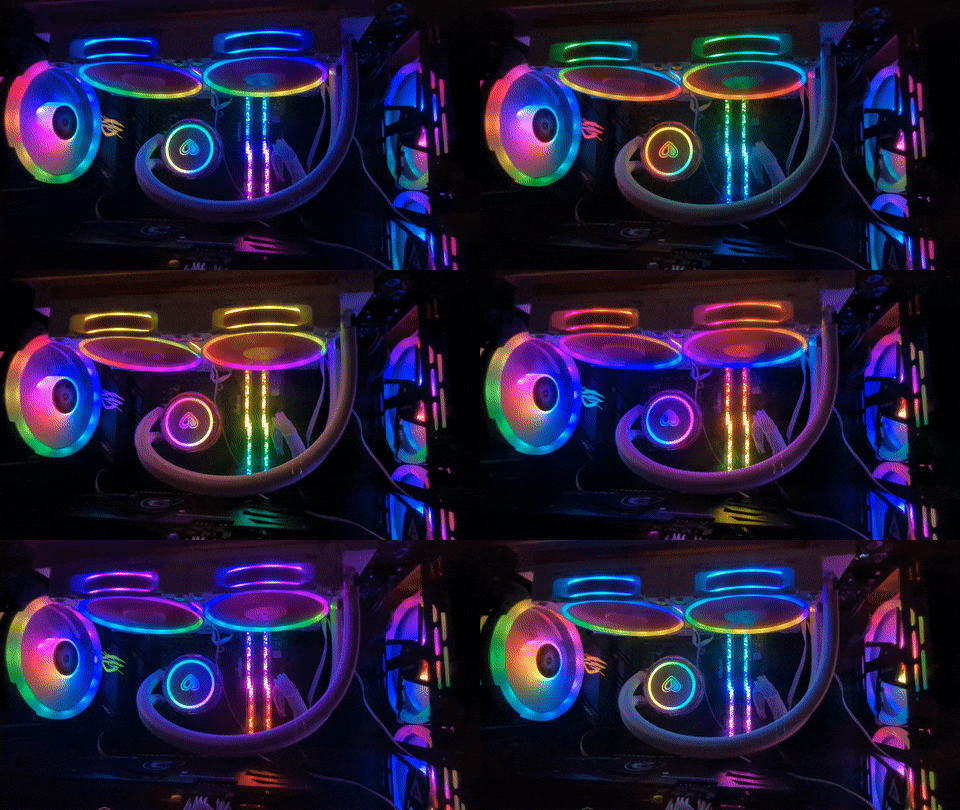
ID-Cooling PinkFlow CPU Water Cooler
Unless you look at the Close Up, everything looks fine! It all fits!
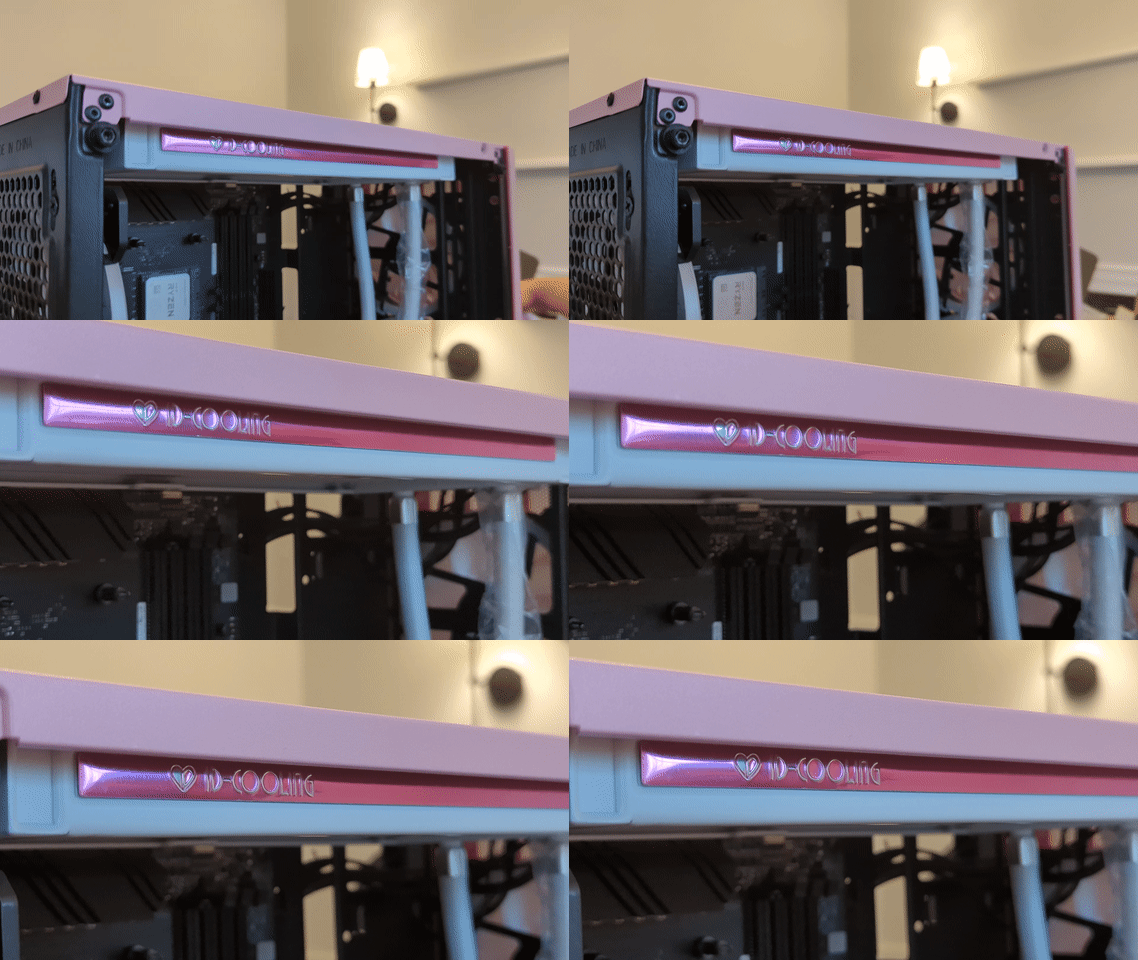
In PC Part Picker I was told that this water cooler may not fit in my case. I had sent everything to my sister’s house, and my sister’s boyfriend/partner, whatever you want to call him, held the cooler to the case and made sure it would fit for me. So we weren’t really sure, at the time, what it meant.
Later, we did find that part of the motherboard ended up blocking the water cooler from completely fitting in. That was resolved in a sketchy-ish way…
But we cut a corner, that was unnecessary, to make it fit up against the motherboard in the PC case. Now if you go back to the “Close Up” photo above, you can see what I mean fully.
We ended up cutting off one of the corners of the cooler. DON’T WORRY, that part was unnecessary and hollow! It was just where the screw would have gone in from. So I only have 3 screws holding it up I believe, and it fits nicely and evenly after cutting off that last corner. It was such a dumb thing that would make it not fit, but again could have been resolved if cases were made to a common standard.
One thing I really don’t like was, you can’t twist the heart part around to get the heart right side up. I saw many photos on the Amazon product page where the heart is off-center, and that’s because of the way it's built. You can’t make it right side up. When I asked my brother-in-law/sister’s boyfriend if we could make it right side up, he said he didn’t like how it sat and with all the pressure and tension on it. And I was like, I would rather be safe than sorry. If he says it doesn’t feel right with the pumps twisted in a weird angle, listen to him. An upside down heart isn’t too bad. It’s not my fault or his fault, it’s the people who made the product.
I saw one user on the Amazon reviews, they took out the front fans and replaced them with the water cooler which allowed them to make the heart pretty much right side up. I’ve saw other people mount the fan backwards or even the wrong way which would obstruct air flow. I’ve seen people mount it also the way he didn’t like it with the tension. Not my case, not my problem, but I rather be safe than sorry. I, also, rather have as many fans as possible if this case is a tight fit and needs proper air flow so it doesn’t catch on fire.
It is a little loud, but I’ve never had a cooling fan before so I can’t compare it to anything else.
I WOULD review this on Amazon, if I could, but Amazon blocked me from making reviews years ago. They wouldn’t give me an actual reason why, couldn’t unblock me because they’re lazy assholes like that, and so I hope people find this review before they purchase it from Amazon.
I honestly wouldn’t purchase this cooling fan again in the future, as there are so many other cooler looking ones that may be, and probably are, better.
Lastly, as I mentioned in my Old PC Specs, I had updated my old RAM to the G.Skill Trident Z Royal 32GB RAM, and obviously I wanted to move that RAM with me to this new case. I got HIGHLY lucky that it actually fit! It was so close to not fitting, but I’m so glad it does. Of course, I had to be the one to buy fancy RAM! But it does look so good in there! Definitely worth it!
Power Supply Unit
I know I overdid it with the PSU, but in hindsight this one was the same price as the 650 one I was looking to get from the same brand. Just a $10 ish difference. This is the one I was going to get, and this is the one I actually got. It made MORE sense for me to get with the higher CPU and eventually grow into it, than go with the one with lesser output. Plus, I did want something that was white. I like and enjoy white cabling.
PC Accessories & Desk Setup
Update January 31st, 2025: Much of my desk setup has changed profusely, and instead of updating this blog post, I’m going to create a whole new post about my desk setup and my must-haves! It will also be a video so be sure to follow me on YouTube where you can see tidbits of my desk setup already!
All in all,
That’s legit my entire build, for now, I’m not going to be updating this blog post if I do upgrade my monitor and headset. I just figured I’d include everything in here as is. Good things take time.
If given the choice, I probably wouldn’t build my own PC again. Don’t get me wrong, it was a nice experience, but it’s a lot of work. It took us 6-7 hours to build it, and then I had to transport it over an hour to where I live. Which is and was entirely scary because if you’ve ever driven on 76, you know what I mean. I don’t mind 76, but when I’m transporting something this delicate, it’s definitely an issue.
The analogy I used before was, “It’s like transporting an egg on a spoon, and the spoon is in your mouth. You can’t let the egg fall.” That was the analogy I made when transporting a PC on 76 to home.
That being said, I wouldn’t have been able to ship something this large to my house anyway! I have no porch! So hopefully, my goal of moving out by the end of 2024 comes true, and with this new PC I’ll be able to take on more work without worrying of frying something! Or something not starting up properly or being scared to use my parts to their fullest capacity!
The housing market is a little wonky right now, but I’m going to be far from any city so it’ll be great to ship things to myself. There are plenty of websites who will build PCs out for you now, and you can even hire someone to do something custom for an affordable price.
I definitely enjoy having my own thing, and enjoyed trying it out, but just too much stress. I’ll stick to building and coding websites. Hardware is just not something I’m really fond of! I would rather pay someone if they enjoy building PCs! But that’s just me!
Hopefully, I didn’t bore you too much and hope this helps, even if just a small part of it helped you out!
I don’t know about you, but I believe not everything needs to be a video. Sometimes, I just want to read a blog post and find the info I want quickly, and usually I don’t choose a video for that.
Till next time!
Diana~