Why “Verify You’re Human” Has Become One of the Most Dangerous Patterns on the Internet
Let me tell you what happened to me at 4:58pm today. I was on Lavendaire’s website. If you don’t know who Lavendaire is, she’s Aileen, a content creator and lifestyle brand built around self-growth, intentional living, and genuinely beautiful products. I’ve been affiliated with her for a few years now, and I want to be upfront about that. I have a discount code (DREAMLIKEDIANA10 gets you 10% off at checkout, by the way). But here’s the thing: I was using her products before I ever became a partner. I go to her site because I actually like it. I browse her shop the way you browse a store you love, not because I have to.
So there I am, just poking around, the way I do every so often. And a “verify you’re human” prompt popped up. I didn’t think twice. I clicked it. The verification “failed.” Then it told me to press a specific keyboard shortcut, paste some text, and hit enter.
I did it.
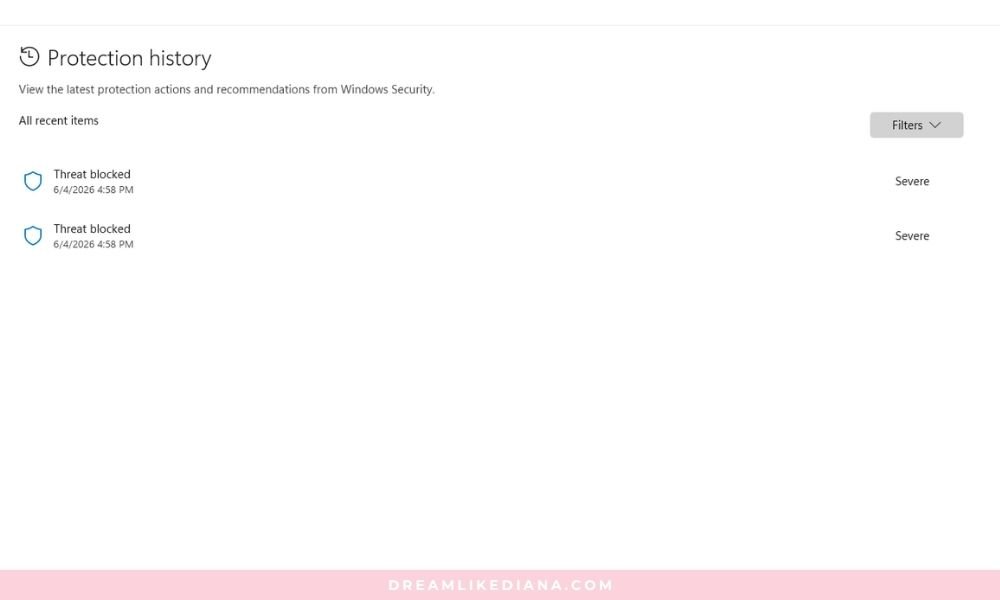
Windows Defender fired immediately. Threat blocked. Severity: severe. And I sat there for a second and said FUCK, WHAT DID I DO?1
I’m writing this because it almost worked. Not because it did. And I think that distinction is exactly the point.
I Know Better. That’s What Makes This So Scary.
I have been building websites since I was 13 years old. I taught myself web development, graphic design, user friendliness, and coding in general. I run an LLC, an actual brand, a Squarespace site I built entirely from scratch without a template, an Etsy shop, a YouTube channel, and a blog that pulls over 3 million impressions a year. I have spent more hours inside the back end of websites than most people have spent thinking about them. I understand how the internet works at a level most people never have to.
And I still almost fell for it.
Because I was tired. Not a little tired. I’m talking about genuinely, deeply, running-on-empty exhausted. I had two graduations this week, both my niece & nephew, both all-day events. One of them required a four-hour round trip drive. I just got back Saturday from seeing my partner, and long distance takes it out of you in ways that are hard to explain if you haven’t done it. Plus I drive back and forth from him nearly 2 hours in one directions each time. And somewhere in the middle of all of it, I twisted my ankle. It’s okay, a little pain, life goes on; but that’s what this week has been. One thing after another. My sleep debt is real and it is stacking. I slept over 11 hours last night alone, and I’m still exhausted enough that I want to cry.
And fatigued people make mistakes. That’s not an excuse; it’s neuroscience.
There’s a reason they say driving tired is as dangerous as driving drunk. Your reaction time slows. Your critical thinking degrades. The part of your brain that stops and says “wait, does this seem right?” goes quieter and quieter the longer you go without rest. You start operating on autopilot, and autopilot trusts familiar patterns.
A “verify you’re human” box is a familiar pattern. I’ve clicked hundreds of them. My brain filed it as routine and moved on before it even registered as something to evaluate.
That’s not stupidity. That’s exactly what these attackers are counting on.
What Actually Happened: The Attack Explained
What I encountered is called a ClickFix attack, and it’s one of the most effective social engineering techniques circulating right now because it hijacks a UI pattern that everyone already trusts.
Here’s how it works:
You land on a compromised or malicious site. Maybe it’s a site you actually know and trust, because attackers will inject malicious scripts into legitimate websites, or clone them entirely. A fake CAPTCHA or “verify you’re human” overlay appears. It looks legitimate. It might even use the same styling as real verification prompts you’ve seen before. You click it. The “verification fails.” Then it prompts you to do something that feels like a troubleshooting step: press a keyboard shortcut, open your Run dialog or terminal, paste some text, hit enter.
What you’re actually doing is executing a command on your own machine. You become the delivery mechanism. The malware doesn’t have to find a way in, because you just opened the door and walked it through yourself.
In my case, Windows Defender caught it before anything executed. But the fact that it got that far is the whole point of this post.
The site I was on was Lavendaire’s. I want to be clear: Lavendaire’s brand is legitimate and her products are genuinely good. What likely happened is that her site was temporarily compromised through an injected script, or I was served a malicious overlay through a third-party ad or script running on the page. This is not a reflection of her or her business. It is a reflection of how sophisticated and widespread these attacks have become. Any website can be a vector.
The Evolution of “Verify You’re Human”: From Annoying to Dangerous
The original CAPTCHA (Completely Automated Public Turing test to tell Computers and Humans Apart) was introduced in the early 2000s as a straightforward gatekeeper: show a human a distorted image of text, ask them to type it out, and use the fact that computers couldn’t reliably read distorted text as proof you were dealing with a person. It was clunky. It was annoying. But it was honest.
Then came reCAPTCHA, which got smarter. It started analyzing behavior, not just responses. Are you moving your mouse like a human? Did you scroll before you clicked? How long did you spend on the page? The checkbox version (“I’m not a robot”) works almost entirely on behavioral analysis happening in the background. The checkbox itself is almost theater.
Google’s current Invisible reCAPTCHA and newer alternatives like hCaptcha and Cloudflare Turnstile operate almost entirely in the background. You often don’t even see them. They’re watching how you interact with the page and making a determination silently.
Here’s the irony: the more invisible and frictionless verification becomes for legitimate users, the more suspicious any visible, interactive verification prompt should be.
Real modern verification rarely asks you to do much of anything. If a verification prompt is asking you to take additional steps, especially anything involving your keyboard, your clipboard, or a command line, that is not a legitimate verification flow. Full stop.
But most people don’t know that. Most people’s mental model of “verify you’re human” is still the old CAPTCHA: you click a thing, maybe solve a puzzle, and you’re through. Attackers know this. They’ve built their entire attack around it.
Why This Works: The Psychology of Trusted Patterns
Social engineering attacks don’t work by being clever. They work by being familiar.
Every time you’ve clicked a CAPTCHA and moved on with your life, you were building a neural shortcut. Verification prompt equals routine friction equals click and continue. Your brain learned that this is a normal, harmless part of using the internet. Repetition created trust, and trust created a blind spot.
The psychological term for this is habituation. When something happens repeatedly without consequence, your threat-detection response dampens. You stop scrutinizing it. It becomes background noise.
Attackers study UX patterns for exactly this reason. They know that a prompt styled to look like a verification box will bypass your critical thinking because your critical thinking has learned that verification boxes are boring and safe. They’re not hacking your computer in the first step. They’re hacking your expectations.
Fatigue makes this dramatically worse. When you’re sleep deprived, your prefrontal cortex, the part of your brain responsible for deliberate decision-making and risk assessment, is functionally impaired. You’re more likely to rely on heuristics, mental shortcuts that work most of the time but can be exploited. “This looks like a CAPTCHA” becomes “this is a CAPTCHA” without the usual skepticism stepping in.
This is also why these attacks spike during high-stress seasons. Tax season. Holiday shopping. Graduation weeks. The moments when people are most distracted and most exhausted are the moments when these attacks are most likely to land.
The Red Flags (That I Missed in the Moment)
In retrospect, and with a functional amount of sleep, the attack had several clear tells. I want to walk through them because knowing what to look for is the only actual defense.
The verification “failed” on the first try. Real CAPTCHA systems are designed to verify successfully. Failure on a legitimate system typically results in a new challenge, not a new set of instructions. If a verification prompt fails and then redirects you to a different action, that is not a legitimate verification flow.
It asked me to use my keyboard. No legitimate browser-based verification prompt will ever ask you to press a keyboard shortcut, open a terminal or Run dialog, paste text from your clipboard, or execute any kind of command. The interaction is always self-contained within the browser and within the UI. The moment any verification prompt reaches outside of that container into your actual operating system, you’re looking at an attack.
It asked me to paste something. This is the real mechanism. What happens in a ClickFix attack is that the malicious site silently copies a command to your clipboard when you interact with the fake verification element. When you paste, you paste the malware delivery mechanism, not whatever you think you’re pasting.
If a site has told you to paste something as part of a verification flow, close the tab.
The prompt appeared on a site that hadn’t had it before. This one is subtle and not always applicable, but it’s worth noting. I had been to Lavendaire’s site many times. It had never had a CAPTCHA prompt before. Novelty on a familiar site is a signal worth pausing on.
The urgency and simplicity of the instructions. Legitimate security prompts are generally explanatory. They tell you what they’re doing and why. Malicious prompts are directive. They just tell you what to do. That simplicity is designed to reduce the time you spend thinking.
This Is the Second “Two-Minute Mistake” I’ve Almost Made
I posted a YouTube video recently about how a two-minute fix almost cost me everything. If you haven’t seen it, the short version is: I wanted to change the wording in my shop from “only X available” to “only X left” (there is a genuine difference in how humans respond to those two phrases, by the way; scarcity framing matters in consumer psychology). I thought I had to do it through code. I did it through code at 11 o’clock at night while I was exhausted. The code sent my entire website into a boot loop. It took me 3 hours to fix, and I genuinely thought I was going to need customer service to help me, except it turned out that because it was custom code, they wouldn’t have been able to remove it for me anyway. I would have had to pay someone or figure it out myself. I figured it out myself. But I was lucky, and I was sitting in a mess of my own making at 1 AM because I made a decision when I shouldn’t have been making decisions or working that late at night. Period.
The throughline between that story and this one is the same: exhausted Diana is not a safe operator. I can still get shit done as a sleepy girl running a business, but when it comes to exhaustion maybe think twice about the things that I say to myself will take “2 seconds.”
This is something I keep learning and apparently keep needing to re-learn. There are things that require your full cognitive capacity. Editing code on a live website. Clicking through anything that asks for unusual input on the internet. Those are not things to do when you are running on fumes.
The lesson isn’t just “be careful online.” The lesson is also: know when you are not in a state to be careful, and protect yourself accordingly. That means not doing high-stakes internet tasks when you’re depleted. It means having systems in place so that when your brain is tired, your security software is still working. It means building habits that don’t rely on you being at 100%.
Because you will not always be at 100%. That’s not a character flaw. That’s being human.
What to Do If This Happens to You
I want to be really specific here because most “what to do” advice online is vague to the point of being useless. Here is exactly what I did and what you should do.
Step 1: Do not panic, but do act immediately. If Windows Defender or your antivirus fires and says it blocked a threat, that is a good outcome. It means the threat was caught. But it does not mean you can shrug and move on, because sometimes what gets blocked is one component of a multi-part attack.
Step 2: Disconnect from the internet. Before running any scans, disconnect. Unplug your ethernet or turn off your WiFi. If there is any active communication happening between a piece of malware and a remote server, cutting the connection stops it.
Step 3: Run a Malwarebytes quick scan first. Malwarebytes is free for the basic version and it’s genuinely good. Run a quick scan to surface anything obvious.
Step 4: Run a Windows Defender full scan. A full scan takes longer but it checks everything. Don’t skip it because you’re impatient.
Step 5: Run a Windows Defender quick scan after the full scan. Yes, both. The full scan is thorough; the quick scan afterward checks the most commonly targeted locations a second time with fresh definitions.
Step 6: Run a Windows Defender offline scan. This is the one most people don’t know about, and it’s important. Some malware is designed to hide from scans that run while Windows is operating normally. The offline scan runs before Windows fully loads, which means the malware can’t hide. To access it: Windows Security > Virus & Threat Protection > Scan Options > Microsoft Defender Offline Scan.
Step 7: Change your passwords from a different device. Even if all scans come back clean, if you have any reason to believe something executed before your antivirus caught it, change your most important passwords from your phone or another device. Start with email and any financial accounts.
Step 8: Check your browser extensions. Some attacks install browser extensions that continue operating after the initial threat is removed. Go into your browser settings and look at installed extensions. Remove anything you don’t recognize or didn’t install yourself.
Step 9: Let yourself breathe. If your scans all come back clean, they came back clean. You don’t need to burn your computer down. I ran every scan I could think of and everything came back okay. Windows Defender did its job.
A Note on Where Verification Is Going
I said it in passing and I want to say it directly: I was actually thinking about adding one of those click-to-verify boxes to my own site before this happened.
Absolutely the fuck not, anymore.
Not because I think all verification is bad, but because I think the visible, click-based verification pattern has been so thoroughly compromised that it creates more risk than it mitigates for smaller sites. If someone lands on my site and sees a verification prompt, I don’t want them hesitating for even a second about whether it’s real. The best way to guarantee that is to not have one.
The honest trajectory of this technology is toward invisibility. Background behavioral analysis. Server-side bot detection. Honeypot fields. Patterns that work without ever surfacing a UI element that a user has to interact with, and therefore without ever creating a UI element that an attacker can impersonate.
We are in a transitional moment where the visible verification prompt is being slowly abandoned by legitimate systems while being actively adopted by malicious ones. That inversion is what makes this moment particularly dangerous. The more you trust the pattern, the more the pattern can be used against you.
Stay skeptical. Stay rested when you can. And if something asks you to paste a command into your own computer to prove you’re human, close the tab.
You’re human. You don’t have to prove it by handing over your machine.
Have you run into a fake verification prompt before? And if you’re shopping Lavendaire’s products, my code DREAMLIKEDIANA10 gets you 10% off at checkout. I’ve been buying her stuff long before I was a partner, and that hasn’t changed.
Till next time!
Diana~
Found this helpful? Connect with me:
SHOP | EXCLUSIVE OFFERS | YOUTUBE | FREEBIES | TOSS A COIN