Google Pixel vs iPhone 15: Why I Switched & What You Should Know

All photographs are original works taken and created by dreamlikediana. All artwork and content are protected by copyright law. Reproduction or distribution without express written permission is strictly prohibited. ©DREAMLIKEDIANA - All Rights Reserved
I have been Team Android, for about 10 or 11 years, but I do own an iPad. I swore up and down that androids have always had the best and greatest tech, especially for their price point. Now, it never seemed like it, because androids would always perform poorly on social media apps like TikTok, Instagram, etc. But there’s a reason why that is, and it definitely has gotten better with the newest android OS and phone releases, but they’re still lacking features that only iPhones have.
After all the latest android updates, I have gotten frustrated with the updates literally slowing down my device, breaking customizations, blocking customizations, and more. I had already wanted the iPhone 15, mainly because it’s pink, but I started to do my research in figuring out if it was a viable option for me. Ultimately, we wouldn’t be sitting here if it wasn’t, and so I’m doing a deep dive on switching from Google Pixel to iPhone 15. Let’s get into it.
In this post you will find:
iPhone 15 Pros (Functions, Design, Customizations, Display)
iPhone 15 Cons (Functions, Transfer Process, Design)
eSIM (safety, how to protect yourself)
iPhone 15 Neutrals (Functions, Camera, Design)
What made me switch overall
What I look for in a phone
💖 Psst... I also run a small art shop! If you love cute, useful things like stickers, journals, or creative tools—check out what’s new in my store.

iPhone 15 Pros
Functions
☆ FaceTime is truly unbeatable. I’ve tried video calling on every and any platform, and the quality and service is so much better on iPhone to iPhone via Facetime than anything out there. Unbeknownst to many iPhoner users though, an iPhone CAN call an android device via FaceTime. But the quality isn’t the same. It’s still better than let’s say messenger, for example, but it has to be an iPhone user making the call vs it being a 2-way street. Being in a somewhat long distance relationship, FaceTime quality time really comes in clutch.
☆ Apple Ecosystem. As a longtime user of the iPad, I love the Apple ecosystem. Everything at my fingertips via iPhone or iPad is amazing. I definitely want more Apple products because it’s so simple and easy to use. I don’t have to shuffle things around or go around in circles to get items from one device to another. It’s all there! I’ve been needing a laptop for quite a while now, so I’m definitely going to be saving up for a MacBook.
☆ The ability to choose your shortcuts. I’m really used to all android devices having a shortcut either internally in the drop down menu or with gesture controls to make a screenshot. It’s so much better than fumbling with the buttons. And I tried to use the screenshot with the 2 buttons, but I fumble a lot. So it’s been so helpful to be able to choose my shortcuts. I set double-tap as my screenshot shortcut. It takes my phone a second to read it though, which is very comparable to android also!
Design
☆ The fact it’s USB C. I don't have to change any of my cables, chargers, or accessories, because it's USB C. It’s such an easy switch from Google Pixel to iPhone because of this. And I have all legit MFI certified cables and accessories for home, my car, travel, etc. I’m so glad I don’t have to put out another arm and a leg replacing everything.
☆ Fast charging even faster than my Google Pixel. So much so I was shocked.
In general, I also know the latest android updates were messing with people’s batteries as of late. Because multiple friends who are still Team Android were complaining about their devices and the latest android updates. If you want to switch to iPhone, find a way to keep your android & get onto the iPhone 15 or newer models because the USB-C is here to stay and I’m ALL FOR IT. Not all new innovation is needed, sorry Apple, I’m with the EU on this one!
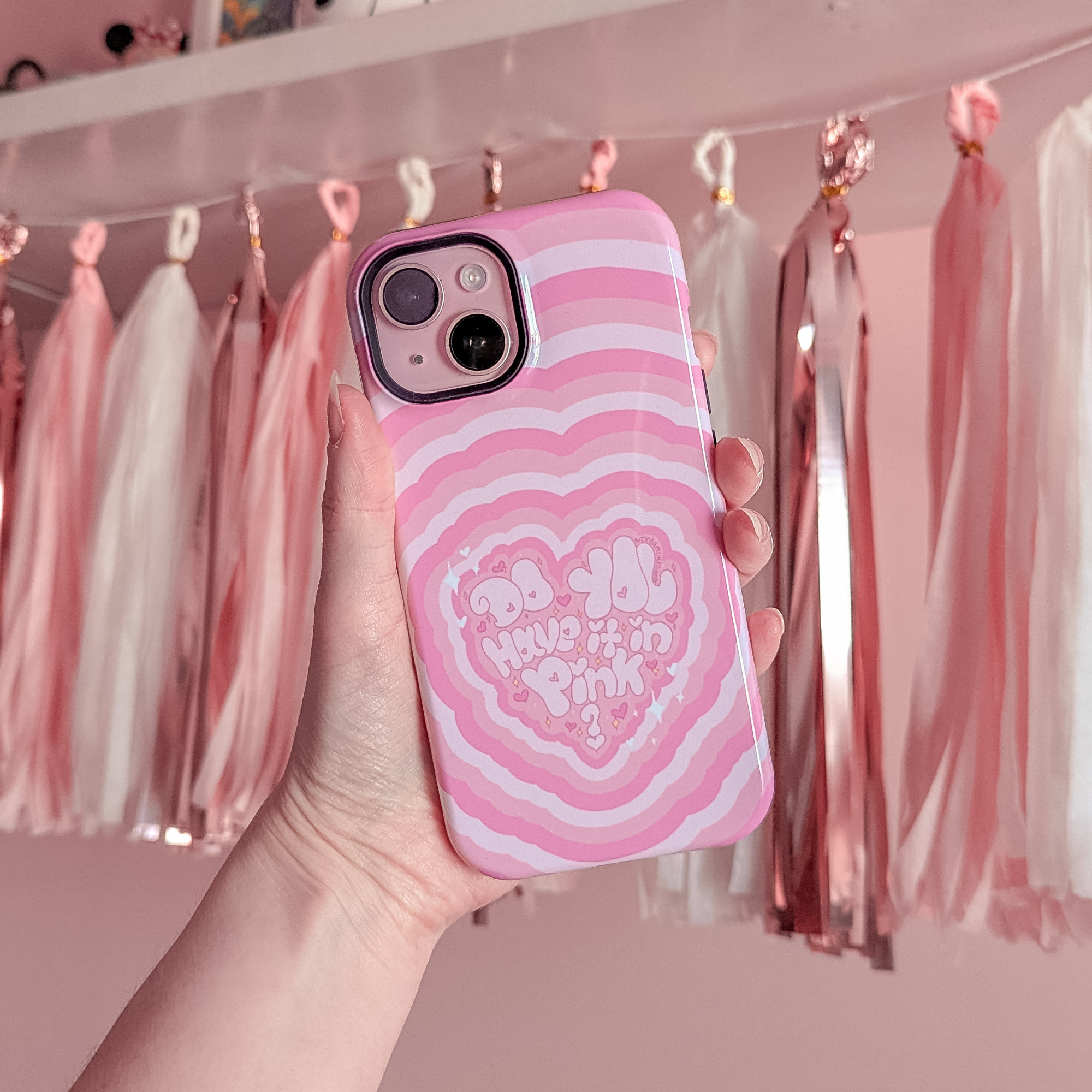
☆ THEY HAVE A PINK ONE! That was my MAIN selling point for this phone. I needed it solely because it was pink. I have NEVER seen a pink phone on the market. Us girlies are the ones using and utilizing our phones THE MOST. Prove me wrong.

☆ The iPhone 15 is smaller than what I'm used to, but it's great for me because I have VERY tiny hands. It's also a lot lighter than what I'm used to, but it's also great because I feel like it was way too heavy for my tiny hands and my previous phone kept causing my wrist and fingers issues when I wanted to take photos.
☆ Face Unlock. I’ve never used face unlock in the past with my other phones because I wear glasses. I flip through between glasses and contacts and I know in the past some phones struggled with this. iPhone 15 recognizes all my ugly angles even if I’m wearing glasses. It recognizes me even when I’m wearing a sheet mask too, sometimes. Not always.
It even recognizes me in the dark while laying in bed, which is remarkable, but if I have my face smooshed up against a pillow it doesn’t recognize me at all. This honestly makes me feel safe knowing that not just anyone can get into my device. But for that reason I will not be turning on “delete data after 10 attempts.” My passcode is strong enough, no one’s going to guess that. And I don’t use my phone in public.
In public it is also in a thick wallet case at all times either tucked into a secret pocket next to my boob or wrapped around my wrist with my hand gripping it. By the way, I carry knives on me at all times. If you come near me, I have one of my knives ready at all times. I will not hesitate to stab anyone and just because I have a baby face doesn’t mean shit. I’ve been traveling alone since I was 14, wandering off alone since I was 2. I have a lot of street smarts in me that you wouldn’t expect me to have.
Customizations

Each month, I set my lock screen to a vision board that reflects my goals and aspirations. Discover why I practice this ritual and how it empowers me to harness the positive energy of the month, by reading more here.
☆ Lock screen customization & being able to have multiple lock screens and quickly choosing between whichever one I want. WHAT A GAME CHANGER.
Like, sure, I can do this too with my pixel, but there were very noticeable flaws and it took a lot longer to do. With an iPhone, it’s instantaneous.
☆ iPhone customizations as a whole. I’m so glad Apple made customizations like this. Widgets were always an android thing, but including them and making them BETTER on the iPhone is revolutionary!
I don’t know whether it was part of their growth plan to eventually do so, but I’m so glad I’m joining during an era when this is already a thing AND IT’S BETTER THAN ANDROIDS. I cannot stress how much better it is.
With android, you get limited customization available to you with what you get from the phone, but for you to do more customizations you need a launcher. Launchers drain your battery and RAM like crazy. I also hated how you had to constantly have it on; it boggles my mind.
There was a widget work around, to mitigate the launcher use, but with one of the latest android updates, it broke it completely. It ROYALLY sucked. Essentially what the widget did is what the widgetsmith app does on iPhone. It was a shortcut button, but all androids decided to break all those. -_-
Display
☆ On screen text animations, enough said. We don’t have that on android, and it’s just a lot of fun and cool stuff. I kind of still forget it’s there, as I’m sure many others do too, but the fact the option is there… I hope it never goes away.
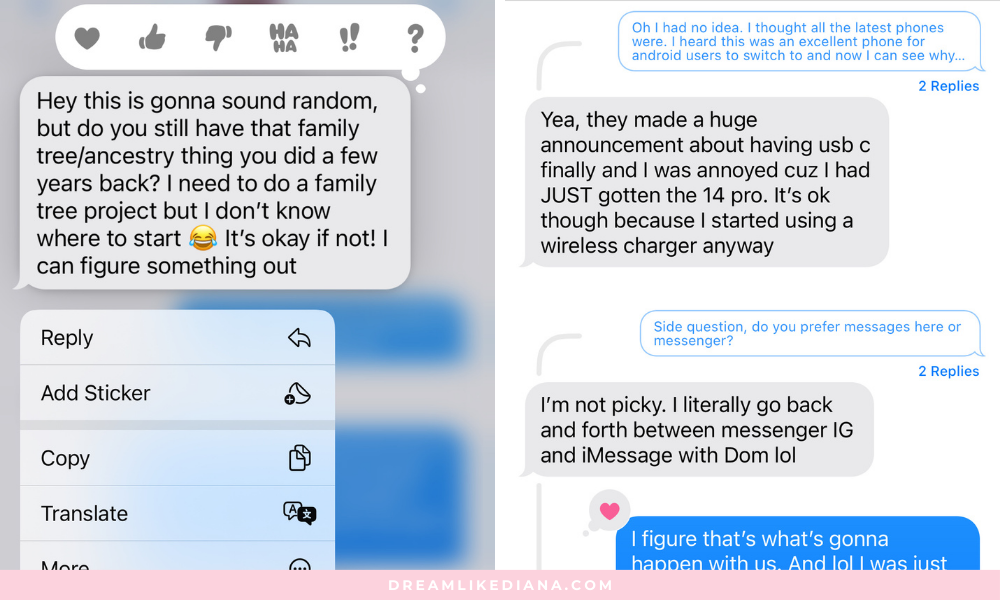
☆ Reply threads. If I was talking to another android user, I can reply to a specific text message of theirs. But it doesn’t show as a thread as iPhone to iPhone does. I find this a really awesome feature on the iPhone side of things.
☆ Being able to react to images. Android users were able to heart or add any emotes to any text, it didn't matter if I was texting an android user or an iPhone user. With iPhone, you only get preselected options on what you can do, but you can also apply a sticker or emoji of any of your choice. Which is a whole other interesting function of its own. WILD.
On android, like I said, you can heart or add any emote to any text message but not images. I love being able to “heart” images that are sent to me.
☆ Spotify controls on the lock screen are stunningly gorgeous. Big enough and easy enough to control compared to the issues I had on my Google Pixel. It wasn’t always like this until one of the updates in the last year, and it became absolutely frustrating to deal with. It was great while driving with Google Maps on, but I don’t always have maps on because I don’t always need maps on.
Google Pixel made it impossible to switch between songs via the lock screen, and I still have an older vehicle because I live in the city, so I don’t have bluetooth or steering wheel controls like other people do. Honestly, this is a great feature even if you’re at the gym. The Pixel buttons were just too tiny for my tiny fingers, I can only imagine the issues someone with chubbier fingers has.

☆ The Instagram app is like made to work best on an iPhone, and I notice the quality! It is superior and by far amazing. Every feature Instagram has ever introduced works as it should if not far better than my expectations.
That’s not to say it’s all amazing, especially coming from an android, the app somewhat functions better and is less rigid on android. The things that are great on an iPhone, all your posts & videos look high quality! Just absolutely amazing! When I’m listening to music and then go to post a photo to my feed, the phone will automatically pause my music while I’m going through the process. Then proceed to resume it after I’m done with the process.
Beyond that, I can finally use the layering feature with how Instagram intended for it to be used. And it’s only possible on Apple devices. We don’t have the layering feature on android phones. Which means like, I can finally put a background image behind a post I’m sharing to my story.
The Instagram experience, as a whole, on Apple devices definitely excels than that on android, and honestly there IS a huge reason as to why. You can read about it on another blog post of mine, here. It does have insight as to why androids look shittier on Instagram than iPhones do, so give that a read if you’re interested.
iPhone 15 Cons
No phone is ever going to be perfect, that’s just a fact. And someone as techy as I am, will always have some cons to just about any device. Every device, product, whatever out there can be bettered upon!
Functions
☆ The refresh rate is 60hz for a 2024 phone, my google pixel 6 was 90hz. so i notice the slowness and lag of it. it's not terrible, i'll get used to it, it's just like really? It's 2024.
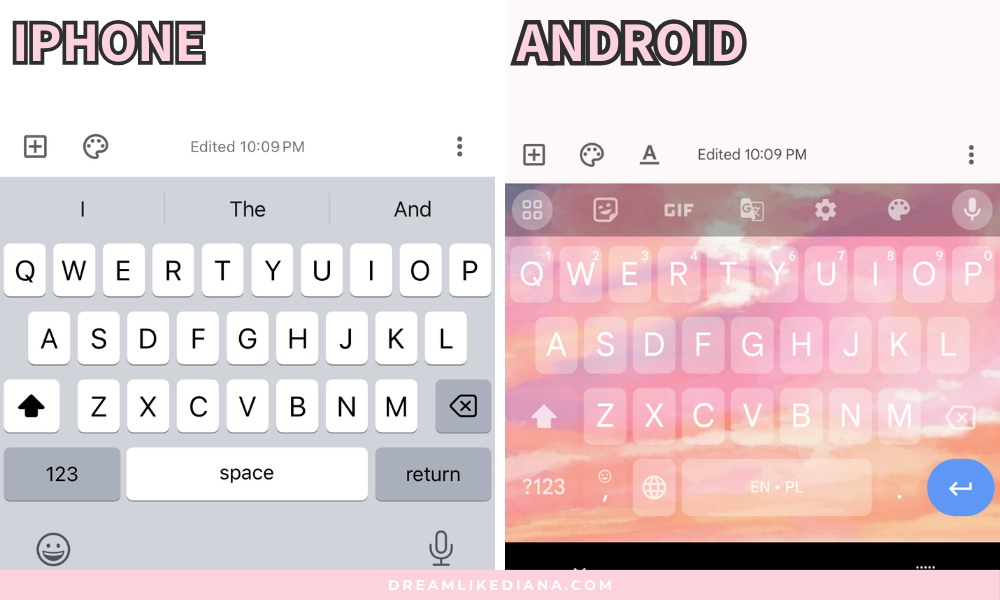
☆ Typing response is slower. The rate at which the keys click and show up on screen, when I text, is vastly slower than androids. I'm very good at typing quickly even with T9 texting. I was really good at getting a text out, with grammar, and spelling, full blown with T9. So like, it is a bit of a con for me because I usually do like to chat with people and am unable to type as fast as I want to. But it's not the end of the world, and maybe, JUST MAYBE this will get me to stop using my phone so much.
I would do a WPM typing test, but I’m now accustomed to the iPhone’s keyboard layout and it wouldn’t be a fair test or a fair comparison.
Typing the same quotes on both devices. See the differences in layout & key response time.
☆ Autocorrect is off putting. I don’t know how to explain it, but autocorrect on Apple phones is not that correct. It suggests words that make no sense to what I’m actually typing. Or it switches to weird words, it’s frustrating, honestly. My parents used to complain about autocorrect and I didn’t understand why because I was on android. I loved autocorrect on android devices, but I get it now. Autocorrect on Apple phones is … off. There’s something that’s not quite there about it.
☆ To back your photos up on Google Photos, no matter what settings you choose, I still have to keep the Google Photos app on, at all times, for it to do anything. While with android, you don’t have to do that. It was always automatic whether via wifi or cellular. I have unlimited data thanks to AT&T so I find this to be an oversight.
I don’t fully trust JUST iCloud, when I back things up I do so in multiple places. Ie. My pc, my backup harddrive, I pay for 2T Google One, & I pay for iCloud. I kind of expect a seamless transition, and I had this same issue on the iPhone 4s many years ago. And my parents have older iPhone models too, so I expect that for their phones, but it’s 2024 guys. Like come on. No one wants to lose anything they own due to an oversight, and a lot of people do which absolutely sucks. I constantly vouch for Google because it’s saved my ass so many times!
Transfer Process
☆ While making the switch, texts, apps, and contacts will transfer, but what didn’t transfer over is any media I shared via texts.
Thankfully, I still have my old android device. The media did transfer over to an older iPhone, but it would not do so to my newer one. I don’t know if that’s a one off glitch or just something that happens. I know it’s not a big deal, but it still kind of sucks. This is what they look like in the text portion of my iPhone 15.
When I go to try and download them, they just never go through no matter how long I wait. I’ve tried so many times.
I refused to do a factory reset because I was already accumulating new texts, images, and had already set up the phone to my liking. Like I said, not the end of the world, but it still sucks. Especially if you’re entirely giving up your android, make sure those photos and medias are backed up to Google Photos ahead of time, like I did, so you don’t lose anything, otherwise you may be shit out of luck.
Design

☆ Pink only available for iPhone 15. I would have gone for the iPhone 15 Pro Max if it had the same color options as the iPhone 15 does. The iPhone 15 Plus did not suit my needs at all, but one of the main selling points for me was the fact it was pink. I really hope, going forward, Apple has 1 pink option for us girlies out there.
☆ No separate folder for Camera photos. I love organization. I love my ducks in a row. This is a more of a me thing, but I absolutely cannot stand that when I take photos on my camera it doesn’t go into its own album. It’s grouped with everything else. I did not have this on any of my android phones. I always had an automatic Camera album. An automatic screenshot album. Etc. But I don’t have that. I created my own, but I have to manually sort it all the time and it’s annoying. I honestly would assume Apple would have this feature because of just the user experience they give to their users.
☆ Noticeable android vs iPhone Instagram differences. On my android, when I send a bunch of random posts/reels to my man, I can see from the main DM screen when he’s seen something last. He doesn’t check everything all in one go. He checks everything I send him one at a time. If I go into the message, I can see where he stopped at.
I don’t get the same feature on an iPhone. It just says, “Sent 11 hours ago.”
He’s seen a lot of them, and when I go into the DM, I can see which ones he’s seen and when, but on the DM screen I don’t get that feature. Which is wild because I thought he was giving me the silent treatment or something. I was PANICKING. And it’s just a flaw in the design.
It’s not a huge deal, but coming from what I’m used to, it kinda is. Like, I was kinda expecting somewhat the same features.
Again, I mentioned this in Pros a bit, but I have a full blog post about it on my website that you can read about here. I feel like I’m finally getting the result for the work I put in. BUT the Instagram algorithm still sucks.
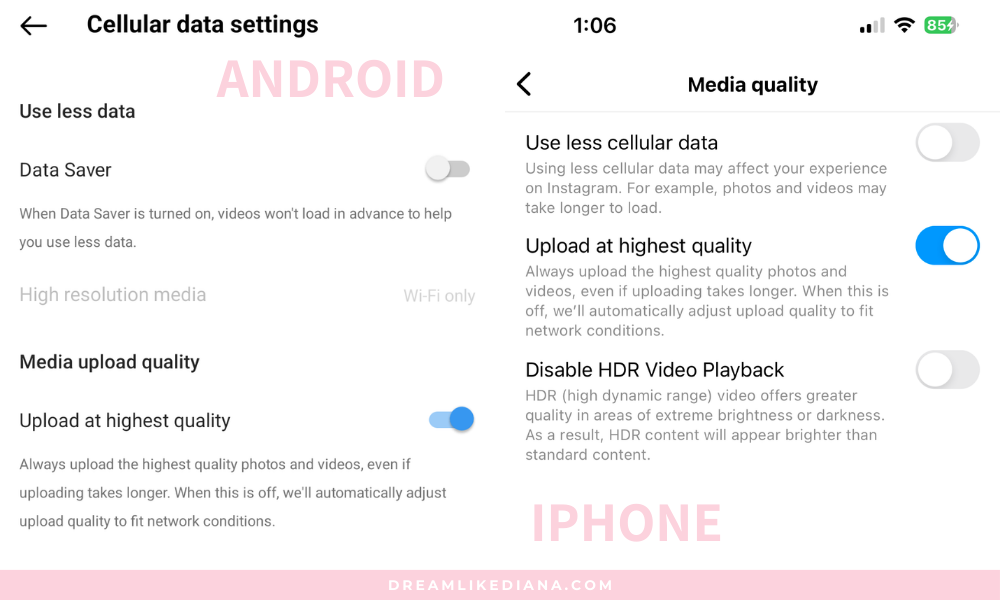
☆ Music app & music on IG glitch… On that note, when I’m listening to music and scrolling through IG my music doesn’t pause like it does for a post (see pros). The 2 audios try to play at the same time, and I absolutely hate it! Definitely a design flaw.
☆ Instagram on the iPhone functions slightly rigidly. Definitely an adjustment, and something I got used to. But it could also be the lack of refresh rate causing it. My android is really smooth, so it was kind of interesting. It kind of gives you an “in the box” type of feeling. After a month of using it, I barely notice it, and the pros outweigh the cons.
eSIM
☆ It’s just eSim from here on out, American models that is. There are SOME benefits to eSIM, but I’m going to talk about the risk I found with it that no one knows about.
Is eSIM safe?
eSIM was created to mitigate SIM card swapping and hacking into phones. Before, people had to steal your phone to get your information, now they don’t. All they need is to transfer your phone number out of your device and onto theirs. They found a way to bypass the protection eSIM should have had, and unfortunately I came across it very early on by chance.
-
You’re going to want to Google,
“default SIM PIN (your phone carrier here)”
as soon as you get your device.
So ie: “default SIM PIN at&t”
which comes up as 1111.
After that you can change their default pin to your own mitigating these issues.
If your carrier doesn’t have their default SIM PIN on their website, you’re going to want to call customer service and say,
"Hi I'm looking for the default SIM PIN for my eSIM to lock my eSIM to my phone."
They might not know what's going on, but if you keep reiterating you just want to lock your eSIM to your device, they'll definitely help or try to.
I confirmed with customer service that once you use up the 3 attempts it will then ask you for the PUK so you can reset the PIN. The PUK you definitely get from customer service.
-
If you do not do this, and you are on public wifi, even public wifi of an establishment you trust, you are in utmost danger of getting hacked and scammed by someone else also using that wifi.
It’s so much so when I brought it to AT&T’s attention, they had no idea what I was talking about. The representatives don’t have the pin, you have to get it from their website or customer service.
Your phone number is essentially tied to everything. It is your life line. A lot of accounts and most people who use 2FA (Two Factor Authentication), if they even do for that matter, use it to a phone number and not an app. So think banks, credit card apps, Venmo, PayPal, sensitive information, Instagram, Facebook, anything else you don’t want people to have access to. If they get your phone number, you’re fucked.
I do use an app, and I have it extra secured, but most accounts out there will ask you to set up 2FA to your phone number first and then you can add it to an app.
But you can actually bypass the app entirely in some cases.
-
Having your phone locked to a carrier is completely different from locking your eSIM to your device.
You will be able to transfer your phone number by yourself or with the help of an agent in the future to a new device as long as you have your own SIM PIN. But to do that, you have to turn on SIM PIN & change it to something only you know.
-
I found this loophole while I was sitting at Big SNOW recently. I was done riding and using the Big SNOW guest wifi to try and download this video I took on my android that backed up to my Google Photos account. My carrier services, despite being 5G and having unlimited data, was taking forever to try and download it, so I turned on the free wifi. Didn’t think it would be any harm at all.
I don’t usually connect my phone to any wifi outside of my house because I have unlimited data.
Anyways, my android backed it up immediately because it was on the wifi, but I don’t have a SIM card in it anymore. It’s just a phone without a carrier. I use it as my go to camera when I do activities too dangerous for my iPhone.
While on my iPhone, and it was connected to the public guest wifi, and I had gotten a pop up from my iPhone, NOT A TEXT, saying, “Please accept this request to port your number to a new phone.”
This isn’t the exact image of what happened, but it is similar. I had a cancel button on mine, and I clicked that. Made sure my phone number and everything was still there, but I turned off wifi the next second.
It’s not Big SNOW’s fault at all. It’s not any establishment's fault. The fault comes down to the carrier & network services, the representatives who don’t have this info readily available, and the shady people doing it. And before you say, “It’s an iPhone only problem.” It’s not though, since eSIM is the future, it’s going to be an eSIM problem. Doesn’t matter if it's an android or iPhone.


iPhone 15 Neutrals
I definitely feel like the iPhone has more neutrals than cons, which is a great thing. These are just personal preference, and my experience with iPhones versus android.
Functions
☆ It took awhile for my iPhone to sync the Google Photos app to my phone, like it's not automatic as android is. I had to scroll to the very bottom of the Google Photos app and wait for it all to load. I’m not saying I have all 100k+ photos and videos on my iPhone device. I’m saying, to be able to access all 100k+ photos/videos at any given point, I had to wait quite a bit, with the app open, for the iPhone to sync the data to the device.
On that note, for me to back up and photos or videos from my device to Google Photos, I need to constantly have the app open. It’s not automatic like android is, no matter what settings I turn on.
☆ Keyboard layout is different. The layout of the keyboard is somewhat different than the one on an android device. It threw me off. Coupled with the fact its autocorrect is not entirely right and the response time is slower when typing, it throws me in for a loop and makes me feel like I have NO energy to text someone. And I wonder if that’s done on purpose or not? I noticed that many Apple users aren’t big texters. I used to be. I could go on for daysssss. I started all my blog posts on my phone. Now, I have no drive to write on my phone, which is weird honestly. I would highly think Apple wants people using their devices all the time so I would honestly assume they’d give users and amazing feature that would drive them to use their phones more and communicate more. I’m betting most people don’t even notice it, but coming from an android for so long, I do notice it. It’s there. Something is off about it. I have no energy for text communications anymore. My fingers are so put off by it.
☆ Haptics are too soft. This isn’t a huge issue to everyone, but to me I like my haptics decently strong. I like feeling the haptics under my fingertips, and with this it’s so soft and delicate it’s barely there and I’m not a big fan.
☆ Headphones & Bluetooth automatically turn on and connect. Let me explain: I keep my Bluetooth off at all times UNLESS I’m using a Bluetooth device. Why? Because Bluetooth drains your battery faster but also puts strain on your battery faster if it’s constantly on.
When I turn on my bluetooth headphones, it automatically connects and my phone automatically turns on Bluetooth for me without having to press a button. BUT ONLY IF the device isn't charging or preoccupied with another function.
I think it would totally be a pro if it always auto turned on when I turned on a device, but seeing as there's a slight flaw, it's a neutral to me.
☆ Standby mode, this is an AMAZING feature. I discovered it by accident, but here’s the shitty part, it only turns on when you’re charging the device. I don’t charge my phone while I sleep. I charge it when it’s dying, on the go, before I go, etc. Therefore it is a neutral. If it was always a feature available while on its side, screen off, that’s a different story. I would have loved it as a daily desk thing. I don’t have room to keep my iPad out on my desk anymore, but it would have been SO GOOD if I could have done this with my iPhone. It doesn’t take up much space, and it’s so cute!

☆ Controlling Spotify on another device with your iPhone. This is such an odd find. I was listening to Spotify on my web browser, and opened up the Spotify app on my phone to share a playlist, only to discover I can control playback control & volume FROM MY IPHONE. I was soooooo confused for a good second. It’s kinda cool though because I own a Google Home, but I have my Google Home play it from my web browser. But being able to control it via my phone too is nice. I did have something similar on my android, but it didn’t control volume, just playback controls.
Camera
☆ Selfie camera. It's 2024, iPhone 15, and the fact the iPhone selfie camera doesn't have a selfie filter function is pretty interesting.
The portrait mode is intriguing, and the quality of the selfie camera IS amazing. It’s not bad, it does what Apple says it does. BUT it accentuates your flaws. All those pores and all.
It's great if you're taking photos or FaceTiming for your man/significant other in nasty ways because they're getting high quality photos and videos.
But if you just want to take a selfie for yourself you're either going to have to post-edit it in an app like Snow so you don't criticize yourself too much or take your photos there to begin with. You can also live with the fact the selfie camera truly accentuates your flaws.
It's just insane to me that it's not already a feature, when it is on android devices and has been for 10-11 years now.

☆ Screen Protector for Camera Lens. When I bought a screen protector for my iPhone, I got a camera lens screen protector with it also. I've never used one for any android I owned. I'm very careful with my phones and own multiple cases for different functions. For example, the case I use while I snowboard is a shockproof case, but I also put it in a well-padded baggy that insulates it so it doesn't freeze when I’m on a mountain or overheat if I’m at the beach.
Anyways, after doing a deep dive into camera lens screen protectors, and asking friends who are Team iPhone, I found that the camera lens screen protectors get dirty A LOT faster. They yellow, they change the quality of photos which defeats the whole purpose of buying for a camera, and they crack easily compared to leaving it alone. So do with that what you will, but I pay for apple care now too. As long as I keep doing what I've been doing I think I'll be fine.
If you're more prone to dropping things and breaking things, then you might want to use it. It’s really your choice: safety or quality?
I definitely use a 9H screen protector on my phone screen though. That is a non-negotiable.
I was also wondering, "How do I know when it's on correctly?" It has notches that are made exactly for the camera lens so you cant mess it up if you choose to put it on. Which is awesome honestly. I wish they didn't have all those issues that I mentioned because that would have been a pro and not a neutral. It is what it is. I've kept all my phones in amazing condition for years on end and with NO extra care coverage on them. You just need to know what your limits are and what you’re capable of.
Design

☆ It feels like the phone would slip out of my hands easier than any other device I have owned in the past would, for whatever reason. It is definitely lighter, which I love, but even with a phone case on it’s almost slipped out of my hands numerous times. I don’t drop things easily or if ever if at all. It’s not a con, but I’m not sure why it is that this phone particularly wants to constantly fall out of my hands.
What made me switch overall?
As I mentioned in the introduction, the latest updates kept breaking the functions of my Google Pixel phone. I travel a lot for snowboarding or in general for adventures, and I need a working phone. I drive FAR. To put it plainly.
I also need a great battery, and I realized it does die faster now thanks to the android updates vs before. Using any phone will deplete its battery, but even when I’m not using the phone it will drop a whole 10-20%. Within the first year of using it, and brand new at that, it was already causing me issues. I expect my phone to only start causing me issues AFTER the first year, if not, hopefully by the 2nd, battery wise.
I’ve been using my iPhone for over a month now, and rely on the Pixel a lot less. Actually, most days I don’t touch my Pixel at all. It dies on its own within a day and a half. But it would be dead, with use, within a few hours if I did use it. With the iPhone 15, even with full blown usage (Bluetooth, social media, Facetime, maps, Spotify, etc.) the battery only comes down to 50-60%. I get TWO full days worth of using my iPhone that that I would of my Pixel. I didn’t have the same love from my Pixel. I did have this feature on my OnePlus though, and it’s what I loved about it most.
I’m also not concerned about Apple’s battery all that much compared to models from way back when because I still own a 2019 iPad & Apple Pencil, and the battery life on those 2 are still AMAZING.
The second reason I decided to make the switch was because any time I was using maps to go anywhere, my phone would just randomly shut off, glitch, or freeze on me. It was A MESS. I, again, expected that from a phone that is like 4+ years old and not a brand new phone!
My third reason was, anytime I opened the camera app, all the settings would jump around on the pixel. It had a mind of its own and it was INFURIATING. It would glitch and freeze constantly with no support from Google.
In general, I had many reasons piling up as to why I wanted to get away from my Pixel. I started doing research about other phones out there. I came to dislike how slow the camera shutter button was on Samsung’s, despite also having an amazing camera, and so I started looking into iPhones instead, all in all, I found something I knew I would love and I absolutely do. Without a doubt. I tell my phone all the time, “I love you.” I know it’s not a living being, but I feel like the universe or God will respond with what you put out into the world. So me constantly telling my android, “I hate this phone,” it kept acting up as time went on. I TRIED to love it, but it infuriated me a lot. Versus, I truly love my iPhone and I often tell it and others, “I love this phone.” It plays so well, and it’s so important to have something that is worth your money in the palm of your hands. We work hard for our money, and in order to care for it we must love our possessions to a certain extent otherwise we’re part of a much larger problem.

Overall, what do I look for in a phone?
☆ Storage size. I always go for 256gb. Why? Because app updates & the system aren’t excluded from your storage size. They take up a portion of your storage. As someone who takes a lot of photos and videos, especially when I’m traveling, I need all the room I can get. I don’t even keep many personal photos and videos on my device. Once everything is backed up to Google Photos, I delete what I don’t want to keep on my device. Therefore, the more storage I can get, the better. But that also means, it’s more expensive.
☆ Camera, how great is the lens? How fast is the shutter release? This is a make or break deal for me.
☆ Color options. It’s not a huge deal breaker, but I would be more likely to choose a pink phone again over any other color.
☆ Battery life, especially since I use my phone a lot. How fast will it deplete while I’m using maps & spotify to go places?
☆ Price point. The reason I was able to afford nice android phones in the past is because they don’t cost an arm and a leg and they’re easier to obtain than an iPhone. I also hopped around from carrier to carrier in the past because service costs a lot, and when you’re working for yourself or in this industry, service costs too much. Thankfully, AT&T has an amazing family unlimited plan and it really doesn’t cost us much per month. I was able to get my iPhone through a deal, which worked out for me because I’m only paying $6 a month for my iPhone now for the next 3 years. But if it was possible to pay it off sooner, I would. It’s not, so it is what it is.
To sum things up,
In wrapping up my journey with Team Android spanning a good decade or so, I've gotta say it's been a wild ride. From swearing by Android's tech prowess to dealing with performance on social media applications and navigating through frustrating update issues, it's been a rollercoaster of sorts.
But the frustrations kept creeping in, thanks to those pesky updates slowing down my device and messing with my customizations.
So here I am, diving headfirst for the shiny new, and pink, iPhone 15, transitioning from android to Apple. It's gonna be a journey, no doubt, but I'm excited to see where it takes me. Here's to embracing the change and seeing what the Apple side of the fence has to offer in the long run.
If you have any questions or comments, leave them down below & I’ll reply to them at my earliest convenience!
Till next time!
Diana~
Liked this post? You can support me on:
SHOP | AFFILIATES | YOUTUBE | &MORE