Utilize Blogger.com to Craft a Professional Website for $25 in 2025
All photographs are original works taken and created by dreamlikediana. All artwork and content are protected by copyright law. Reproduction or distribution without express written permission is strictly prohibited. ©DREAMLIKEDIANA - All Rights Reserved
Have you ever wondered if it’s possible to create a professional website on Blogger.com? I know I sure have. You’re probably thinking, “That is not possible,” right? And I’m here to say, “Oh, but it is.” It very much so is, in fact, it is where I got my start! Blogger.com doesn’t have to look typical or old school anymore, there are designers out there, on Etsy, selling their themes to make your website look professional on the platform, just as I mentioned in my last post.
💖 Psst... I also run a small art shop! If you love cute, useful things like stickers, journals, or creative tools—check out what’s new in my store.

So why choose Blogger.com?
Personally, I decided to host and build my website with Blogger because I didn’t have to pay Google, who owns Blogger.com, a single thing to let my website live here. If you’re just starting out, this is a great option! If you have no ROI (return on investment) or little to no budget, this is where you want to start. Because you just don’t know if you will actually keep up with it or not.
I also mentioned this in my last post, so if you didn’t read my last post on this topic, head over there now.
I’m going to keep it simple here.
My decision came after deep consideration and research and found Blogger was the best fit for me currently. It’s easy to move my website and its content from here to any website, but it’s not always easy to move it between competing hosts and blogger websites.
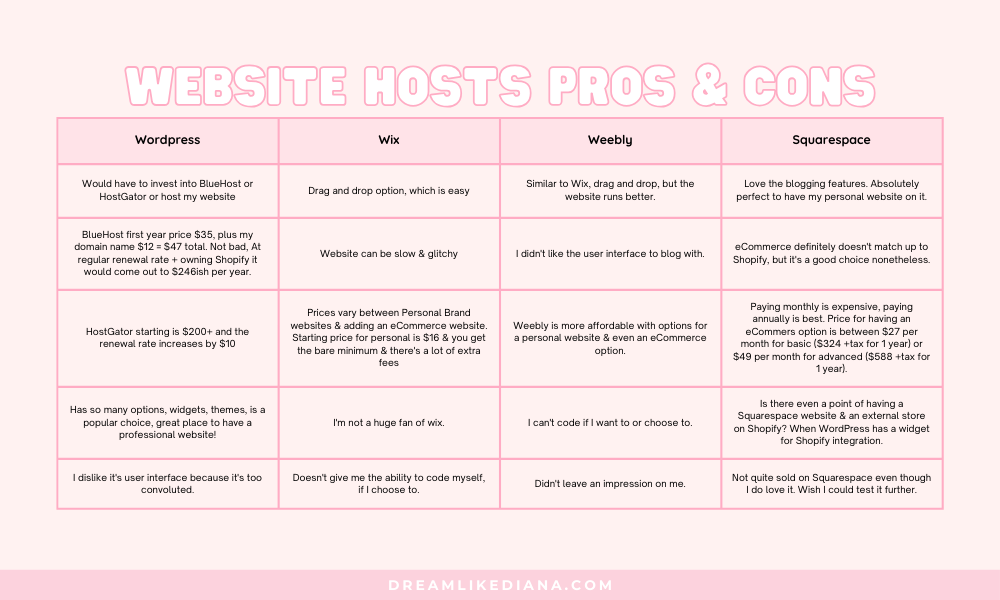
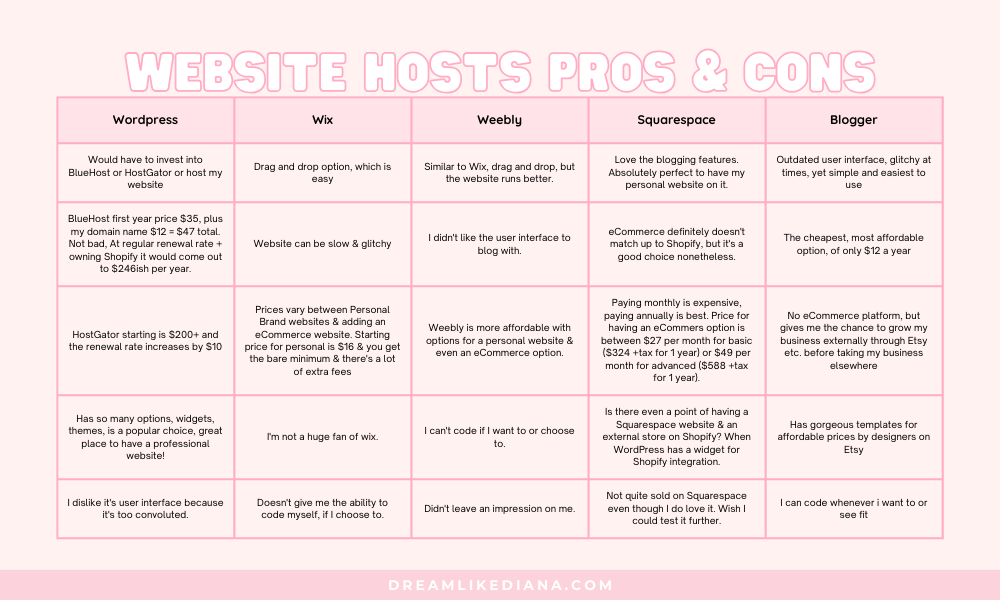
For example, I’ve heard and read people have a troubling time moving their website from WordPress to a different host, as well as other website builder problems. They literally had to hire someone else to do it and even then it cost them. It cost them time, and money and they lost a lot from that process. I knew going in that being with Blogger.com, at the beginning of my journey, was the safe move, the safe space.
Blogger.com has some free, basic, outdated layouts and templates to choose from. Plus there are little to no widgets, but, as I mentioned, there are plenty of Etsy sellers selling amazing designs for layouts to use on Blogger.
A blogger.com website doesn’t have to look like a typical blog anymore! It has so many possibilities, especially if you find that this is something you desire for yourself!
My favorite Blogger Web Designers
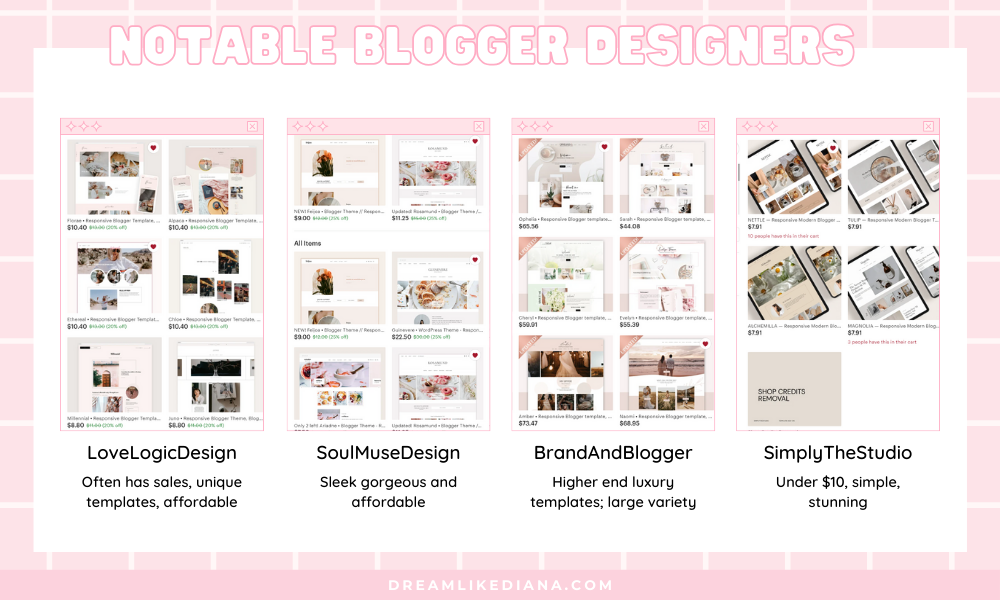
Some of my favorite Blogger.com web designers that make gorgeous templates are:
LoveLogicDesign (prices do not exceed $13, great support, always answered all my questions, updates her designs frequently, updated widgets for me, has sales often)
SoulMuseDesign (prices do not exceed $15, great support, went above and beyond to help me with why my YouTube thumbnails weren’t showing up, as well as changing the email newsletter from MailChimp to ConvertKit)
BrandAndBlogger (higher-end blogger templates, can be pricey, provides luxury, creates custom logos also)
SimplyTheStudio (very affordable under $10, very simple yet classy)
There are so many more to choose from on Etsy! I implore you to take a look. They’re all responsive and will work with or without a custom domain name. You will definitely want a professional-looking website no matter what you do, and the way to make Blogger.com as professional-looking as possible is by buying from someone who makes them!
If you don’t know how to install them, not to worry, many of the sellers will install the theme for you free of charge, unless otherwise stated!
User Interface
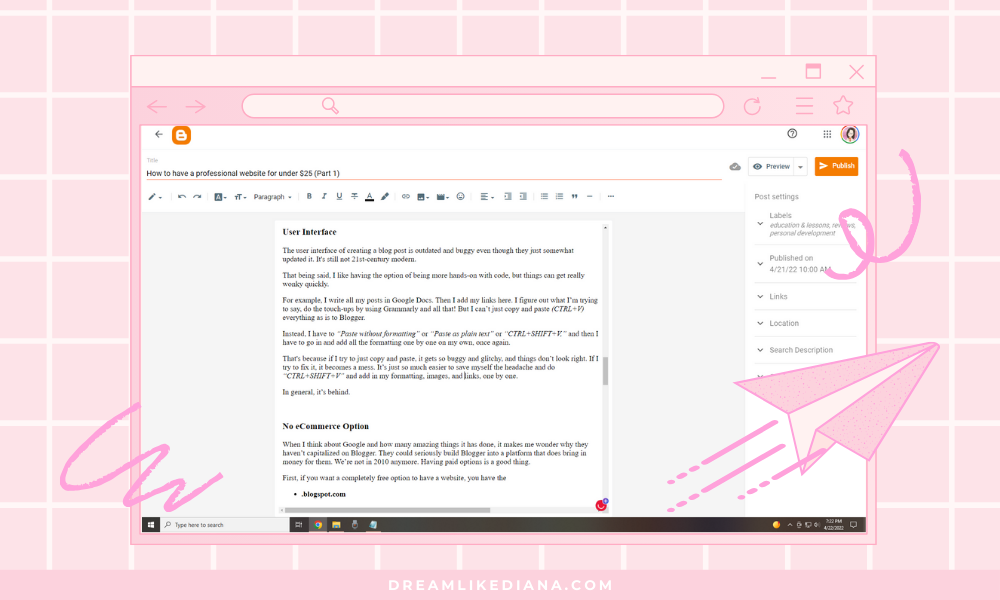
Blogger has a very simple user interface. It’s a little outdated, but it’s not convoluted at all. Which is my gripe with WordPress; I absolutely hated the UI of it completely. I’ve worked with WordPress so many times and tried to like it so many times because “Every successful blogger is on WordPress.” Oh really?! Guess again! As I’m updating this in 2025, my website has grown to over 3 million impressions and I’m on Squarespace, but I got my start on blogspot aka blogger.com and started making money through affiliate marketing on it, which helped me level up!
Being on one website builder on Wordpress has nothing to do with your SEO, how you rank in search engines, or whatever. Sure WordPress has a lot more widgets to choose from, but its UI was a no go for me. There are other website builders such as Wix, Weebly, Squarespace, etc. and I had checked them all out and there’s always something that I’m like, no, ew no, gosh no. Whether the pricing, UI, widgets, you name it, I’m pretty damn picky. Out of all of them, I liked Squarespace the best, but it has a lot of other drawbacks as well.
Custom Coding Capabilities
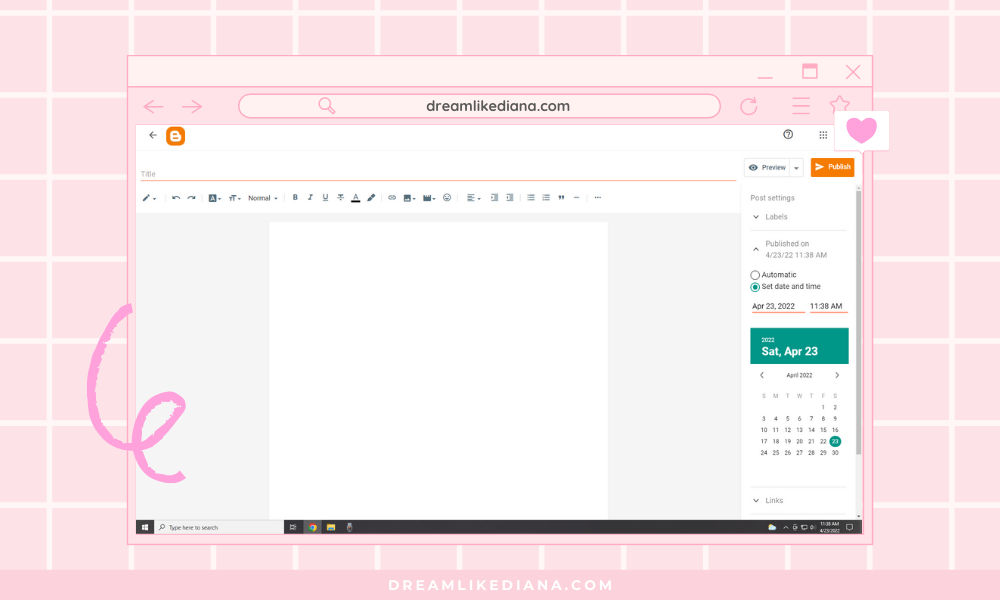
My main and favorite thing about my time with Blogger.com is that I could code within the backend of a post or page, and that was really important to me. I used to be a webmaster and coding was my “thing.” Coding is such a love-hate situation for me. I love it, but then I hate it.
I’ve been coding since I was 13. It was something I was paid to do, for a time, but I burn out quickly every time.
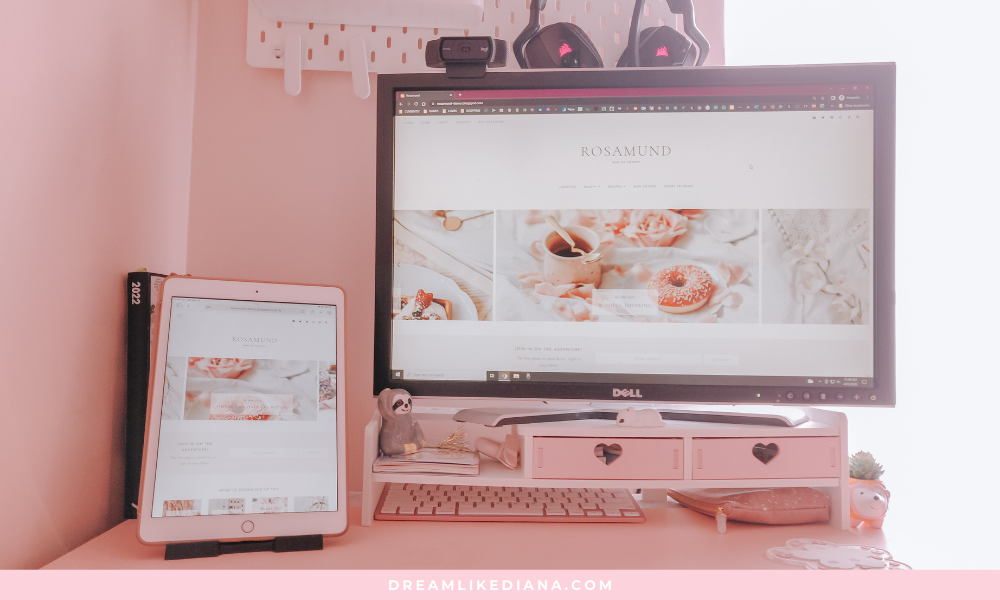
Besides, this website wouldn’t even exist if I hadn’t admitted to needing a change. I literally first started by redesigned and recoded my website about three times from scratch, at that point it became a chore and so obvious to me that I was so over that type of life. It wasn’t making me happy. Therefore, I bought a layout from someone else and instead utilized custom codes here and there where I need and wanted them. I got to give them my own flavor! See photo below.
Blogger.com, by far, is not a popular choice, but I think it would be the smartest. So you’ve been warned.
Host
Choosing a website builder type of website like WordPress, Wix, Weebly, Squarespace, etc. means you will have to pay to host your website. Like Blogger.com, aka BlogSpot, you can host a free version of your website on Wix, WordPress, and Weebly, while having their URL in your custom name. Though, if you want to use a custom domain name with either of them, you have to pay to upgrade.
On the other hand, with Blogger.com you don’t have to pay to host on Blogger. You can easily get a custom domain name from Hover or GoDaddy and set it up with Blogger. So that was a huge benefit to me and every other brand new blogger, influencer, or creator out there.
That being said, if you are jumping into making a business, you may have to turn to a third party to create that business. For example, on Squarespace, you can sell right from Squarespace, but you’re paying a lot to host with them. What I did in the past was,
Hosted with Blogger,
freebies I funneled through an email newsletter with ConvertKit,
You can also utilize KoFi to grow an email list, offer freebies, have a shop, and memberships.
and product sales with Etsy.
Another option is you can create a store on KoFi, RedBubble, Society9, Storenvy, or any other platform and create an external link on Blogger to link out to it. I see a lot of Etsy sellers actually do this, whereas they have an Etsy store but a separate website.
To be honest with you, I don’t really know much about hosting or hosting websites like GoDaddy Hosting, BlueHost, HostGator, GreenGeeks, DreamHost, etc. Some give you the option of blogging, and some don’t. BlueHost and HostGator utilize WordPress while others have their own host and servers.
And as mentioned in my last post, it can get expensive. Don’t let the first-year price fool you! A website on any other platform WILL run you about $100-300+ per year. My Squarespace site with its ecommerce option runs me $300 a year, which includes my domain name, which is about $25 a month. I pay annually. It is cheaper. When I first transferred my site to Squarespace, I bought the personal plan which was $175 a year + $20 for my domain name. But I didn’t have coding capabilities, and while I made do because I have the skill, I wouldn’t recommend it to others. If you’re not great at maintaining a website, you may have to pay someone to do that. That’s something I have done for others before and we do charge a pretty penny.
To really make things easy and less stressful, choose Blogger.com. I legit don’t regret it. Besides, progress over perfection! It doesn’t have to be perfect, you just have to start!
Domain
A domain is simply the URL name of your website. And if you choose a free host you’ll have a URL that looks like this:
Yourdomainnamehere.blogger.com
Yourdomainnamehere.wordpress.com
Yourdomainnamehere.wixsite.com
Yourdomainnamehere.weebly.com
Yourdomainnamehere.squarespace.com
You get the gist.
But if you buy a custom domain name through sites like Hover, GoDaddy, etc. you’ll be able to save your custom domain name for many years to come for a small fee. I only paid $12 a year when Google Domains was around, now I utilize Hover.com for domain names that I have but don’t use anywhere. I spend $18 a year on my domain names on it. That’s about $1-$1.50 a month! But it depends on the URL ending you choose. There are many different URL endings such as, but not limited to:
.com
.me
.org
.net
.blog
etc. And each one has a different price tag on it. .com is the most common!
You’re going to have to do some research to find which website, that sells domain names, has the best price for the name you want with the URL ending you want. As well as, something that is uniquely you or your brand, isn’t already taken, won’t be mistaken for something else, and is something memorable. Something you can grow into overtime! I chose Hover.com because it’s easy to integrate anywhere I want, I don’t have to do anything with it, and it has a very easy maneuverable website and platform. The other websites like GoDaddy, were very confusing and had too many options. Hover.com just sells domain names so I didn’t have to go crazy or get lost!
I definitely do believe in investing in yourself and showing up for yourself, but I don’t believe that you should be stretching yourself thin in the very beginning. Pay what you can and build from there. It’s not your price tag that matters in the end, it’s the content you make.
A few things to make sure
Email Forwarding
Wherever you buy your domain name from, make sure they have email forwarding available, or if entirely possible have an email address come with the website. Sometimes this is an extra option that you need to pay for, but most have email forwarding available for free.
Basically, you don’t want to put your personal email out there for business inquiries, instead, you’re going to want a professional-looking email that looks something like
HI@YOURDOMAINNAME.COM
People will use it, but they won’t know your real and private email address, keeping you safe and secure.
SSL Certificate
Another thing you want to make sure about is if it offers an SSL certificate. What this means is to other users, your audience, etc. it will say your website is secure and safe. It will recognize both HTTP and HTTPS. Majority of domains come with one, but just check to be sure. Usually, you can get SSL either from web hosting provider, domain registrar, or from third party SSL provider. It’s better to be safe than sorry to try and keep it as cheap as possible. With blogspot.com, no matter where you get your domain name, you can get the SSL certificate for free!
To Sum It Up
As someone who’s had a history of knowledge with websites such as Weebly, Wix, WordPress, Blogger, LiveJournal, Xanga, GaiaOnline, Tumblr, and more, I’ve come to know a thing or two if you haven’t noticed! Especially about what I like and dislike. It’s actually through the early days of MySpace, GaiaOnline, Tumblr, and others that I learned to code and use code. I also learned what I like and dislike on a platform. Which is really important.
Finding a user interface that you're comfortable with will be an essential piece of your role as a blogger. To have a successful digital presence, it may take a few years before you even make a mark. I’m sure many people have said this before but, “Consistency is key.” If you’re creating a website just for an ePortfolio, that’s great too!
Till next time!
~Diana
Liked this post? You can support me on:
FREEBIES | SHOP | AFFILIATES | YOUTUBE | & MORE