Building a Professional Website on a Budget: The $25 Blueprint in 2025
All photographs are original works taken and created by dreamlikediana. All artwork and content are protected by copyright law. Reproduction or distribution without express written permission is strictly prohibited. ©DREAMLIKEDIANA - All Rights Reserved
Ever want a professional website, but then realize everything costs entirely too much? Yeah, me too. Today I'm going to tell you how you actually can have a professional-looking website for under $25. No, there's no catch. It's actually pretty simple! It’s how I got my start in the industry of blogging and how you can too!
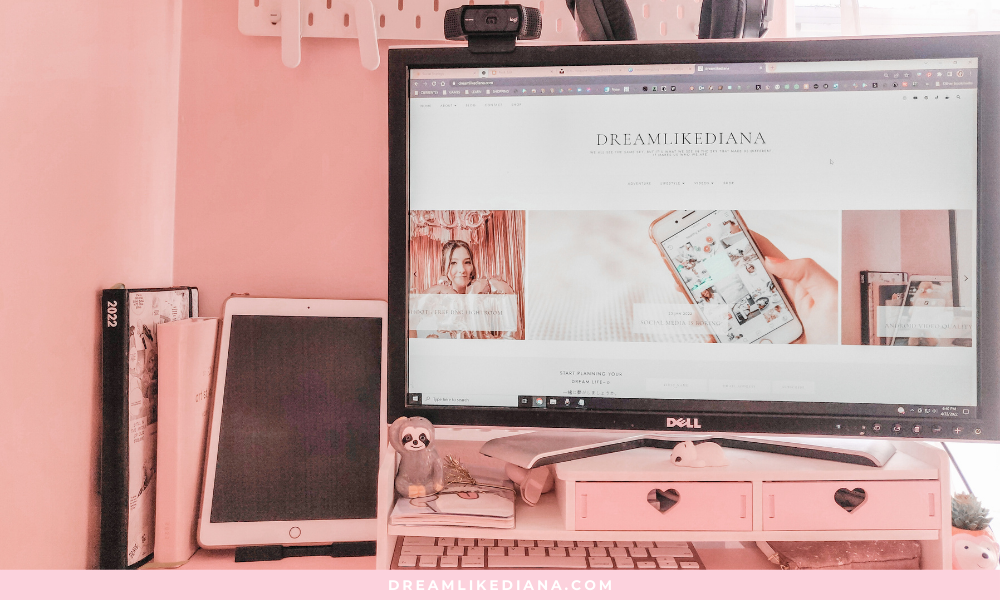
Okay, so maybe there's a SLIGHT catch. It's not that big of an issue, and I'm going to run through the parts you have to sacrifice to get a gorgeous website like the one pictured above. As well as all the other details, pros and cons, tips, you name it.
With all that being said, it's really not that bad, trust me, and things definitely get better once you read on!
So what gives?
Short story, the website is run on Google's Blogger. Long story...
Blogger is outdated in a few ways.
It's definitely obvious the Blogger platform is outdated and buggy at best! But I still managed to have a professional website on Blogger. It still exists, even in 2025! I’m updating this post and getting it out there. This is such a underutilized platform to get your start in blogging and affiliate marketing. Monetization made easy even with no following! And the best part about it…
I only paid $12 a year for it!
Yup! Just $12 a year, compared to renewal prices at every other professional website like WordPress & BlueHost, Squarespace, and Wix. If only Google utilized and took Blogger to a whole new level, just imagine how many people would flock to Google! Especially since we use Google so much already!
💖 Psst... I also run a small art shop! If you love cute, useful things like stickers, journals, or creative tools—check out what’s new in my store.



Links
You'll notice a few key differences with links on Google’s Blogger.com than every other website. But nothing that will take away from your quality, getting your start, showing up on Google Search engines and more! The first thing is links:
.html
if it's a page or blog post.
Or another example, my blog isn't
/blog
like it is on other websites. It's,
/search?max-results=5
Which may or may not confuse people. If you're mobile, you won't know the difference and what's going on. As it still works just like it’s supposed to, but if you're on PC you'll notice it.
So what’s with the link?
The link is because the template I was using transformed the blog format, and used the main page as the landing page. Making it look crisp, aesthetic, and professional (see header image), but to bring in a blog page the code has to kind of deceive the website and the user.
All in all, the link doesn't look pretty, but it works. And everything else looks pretty. So it really isn't that big of a deal. I still had some top-performing posts, like this one (over 2k unique views; ranking in Google), despite this oddity. The growth of this blog post is what landed me my first affiliate marketing and brand collab which allowed me to eventually make enough money to afford Squarespace. Which is what my website, blog, & shop is hosted on now.
Some of you may also point out that there’s a date in the URL, like so:
And some websites don’t do this, but I’ve found some professional websites that actually do. For example, on Kenzi Green Design (she is a brand & web designer):
https://kenzigreendesign.com/branding-designblog/2022/01/20/how-to-build-a-brand-people-obsess-over/
Google has said the date in a URL doesn’t do anything to block one's SEO or how one’s post performs! I will also back this up because some of my posts from Lavendaire and Passion Planner are ranking on the first page on Google.
User Interface
The user interface of creating a blog post is outdated and buggy even though they just somewhat updated it in 2022. It's still not 21st-century modern. That being said, almost every blogging platform I’ve worked with is buggy. No matter which one you choose for yourself. But if you’re just getting your start, it’s not that big of a deal.
My issue before was I liked having the option of being more hands-on with code, but things can get really wonky quickly.
For example, I write all my posts in Google Docs. Then I add my links in the blogging interface. I figure out what I’m trying to say, do the touch-ups by using Grammarly and all that! But I can’t just copy and paste (CTRL+V) everything as is to Blogger.
Instead, I have to “Paste without formatting” or “Paste as plain text” or “CTRL+SHIFT+V,” and then I have to go in and add all the formatting one by one on my own, once again.
That's because if I try to just copy and paste, it gets so buggy and glitchy, and things don’t look right. If I try to fix it, it becomes a mess. It’s just so much easier to save myself the headache and do “CTRL+SHIFT+V” and add in my formatting, images, and links, one by one.
In general, it’s behind.
No eCommerce Option
When I think about Google and how many amazing things it has done (YouTube, Google Drive, G-Suite, Google's Free Certifications, etc), it makes me wonder why they haven’t capitalized on Blogger.com They could seriously build Blogger into a platform that does bring in money for them. We’re not in 2010 anymore. Having paid options is a good thing.
First, if you want a completely free option to have a website, you have the
(yournamehere).blogspot.com
in your name. Just like if you get a free website from WordPress, Wix, Weebly, or Squarespace you would have a
(yournamehere).wordpress.com
(yournamehere).squarespace.com
(yournamehere).wix.com
(yournamehere).weebly.com
But if you want to take your website and domain name to a whole professional level, you buy a domain name.
So I would LOVE to see the Blogger platform eventually grow from what it is, and start adding other options like BlueHost, WordPress, Wix, and Squarespace all have! It has grown a little bit since its release, and the UI was updated ever so slightly just recently.
My main reason for moving off of Blogger.com was wanting to host my shop in one place, and not have to redirect out to Etsy or Gumroad, or any other platform! With Squarespace, I’m not paying Shopify prices for something so small is me, myself, and I. I am paying $300 a year, which includes my domain name. It equals out to about $25 a month, but I can afford that price tag now. But when I was just getting started, I couldn’t justify it at all! AND YOU SHOULDN’T TOO!
But I have found that most people choose to have their initial website with WordPress, and still hold their external website on Shopify. How did I find this? Right-click, "View page source" if you're on PC. But that's beside the point. We’re getting too ahead of ourselves, let’s get back to blogger.com.
Starting with Blogger isn’t all bad!
It is very much possible to have a professional-looking website and your own domain name with Blogger. It's so inexpensive, and I think it's a great choice for anyone who is just starting out!
Because honestly, when I was looking at BlueHost, Hostgator, Squarespace, etc. it may seem cheap in the first year, but the renewal fee a year later is going to cost you. The upkeep, if you're not tech-savvy, is going to cost you. The themes are going to cost you. The support is going to cost you. I don’t need to pay for those because I’ve been working with websites since I was 13. But if you haven’t and don’t know what you’re doing, there's always going to be some sort of cost.
And don't believe what those people who say on YouTube or Instagram, blogging is dead or you can get rich quick. Yes, you could make it within a year if you have the time, dedication, and a profoundly good monetized niche, but for the rest of us, it takes time and patience. You may not see any reward in it for a few years! It took me 2-3 years before I saw rewards from my blogging.
Yes, it’s possible to transfer a Blogger website and its content elsewhere.
That's another reason why I chose Blogger.com and chose to stick with Blogger.com. Because it’s possible to transfer a Blogger website and its content elsewhere, and it was SUPER SIMPLE and easy for me to do. The same can't be said about other websites, well at least not all the time. I'm sure, for a good fee, someone could do it.
I was super considering moving my blog & website to WordPress because my website designer from Blogger.com made the same layout I had for WordPress, but honestly, I'm not a big fan of WordPress user interface even though they're a popular choice. Instead, I love Squarespace and everything it had to offer. Blogger.com & coding for it and Wordpress, I was never fond of. Designing and coding for every other platform has been a breeze for me. Of course, each host has its drawbacks, but the main point here was, I didn’t want to use my personal money on this. I wanted to be able to use funds from selling my designs, illustrations, and more to transfer my website to any other hosting platform that cost me more money. Because at least then I’d be able to justify the means, and I did.
So why should I sacrifice my peace and sanity, constantly migrating websites? Can you imagine me moving from here to WordPress and then Squarespace? I can tell you that it’s not an easy task!
I used to be a webmaster, and I have a love-hate relationship with websites. I’ve done it all, Drupal, WordPress, redesign websites, make a website more SEO friendly, more mobile-friendly, I’ve worked with a college, intranets, you name it, 6 major projects in a small amount of time. I can do it, but it’s exhausting.
You shouldn't have to break the bank just to make a professional-looking website.
The choice is hard, it’s even something I had to weigh a crap ton before I decided on Blogger.com over 5 years ago. I used to disappear for great periods of time, you’ll notice the gaps in my blog posts. 😅 It happens, life gets busy. Or I procrastinate.
So how did I make my decision final? I made a huge list detailing everything, particularly the money side. Let's get into it.
Say, for example, if I…
I went with Bluehost my first year. $35 isn't too bad.
Plus $12 for my existing domain that I got through Google Domains.
Google domains do not exist anymore! It was transferred to Squarespace. You can now buy cheap domain names on Hover.com. It’s how I buy domain names without utilizing them, but just keeping them as a backup for things in the future. The ones I own through Hover.com are $18.99.
I currently pay $20 a year for my domain name, dreamlikediana.com through Squarespace.
That's $47 for the current year, which really isn’t too bad.
But a year from now that's $84+ for BlueHost at their “regular renewal rate” if not more, depending on your plan, any extra packages, and tax, as well as $12 for my domain.
Which comes to a total of $96+ give or take
Excluding tax, because that’s also a thing.
That's $100+ for a website you may or may not always stick to.
I surely wasn’t consistent, so I was definitely like, “I’m not going to blow a $100 on something I don’t always see the reward from. I could use that $100 for something else that will.”
Just like how a lot of YouTubers will say, you don’t need a DSLR camera to start YouTube. You don’t need an amazing setup or amazing host site. You just need to start. Some people will get favored by the algorithm, but that’s rare, for others it takes time to grow.
Buy your domain name first!
Before you do anything though, I would highly suggest getting your domain name elsewhere like Hover or GoDaddy so at least you're never going to lose your domain name. Because if you get the free one through BlueHost or HostGator, and then you choose not to renew for the following year, bye-bye domain name!
It gets deleted from your identity and account once you stop paying for it, and someone else can start using it. Therefore, get it cheap from an external domain website.
Not only that but any and all of your work gets deleted versus just keeping it on Blogger.com for free. I honestly did not mind paying $12-18 a year for my domain name. That’s like $1-$1.50 a month!
If you’re wondering about the nitty-gritty of how I got my website to look so good through blogger…
Well, that’s my next post! I will give you the exact nitty-gritty about making a professional-looking website through Blogger.com, design, domain name, really breaking things down further, and why it’s only going to cost you $20 a year!
It's kind of shocking that Google hasn't done anything with Blogger, and hasn't mentioned that they will. They do have a Google for Creators website and all, but that's about it. What about Blogger?
Till next time!
~Diana
Liked this post? You can support me on:
FREEBIES | SHOP | AFFILIATES | YOUTUBE | & MORE